Latest updates
Automated release notes with GitHub Actions
Learn how the release notes workflow records merged pull requests and creates a weekly archive.
Automated release notes with GitHub Actions
This repository uses GitHub Actions to keep internal release notes current. When a pull request (PR) is merged into main, the workflow creates an entry from the PR metadata. Each Tuesday, it groups the accumulated entries into a dated weekly section.
The result is a lightweight release history that is generated from the work already reviewed and merged in GitHub.
Components
| Component | Location | Responsibility |
|---|---|---|
| GitHub Actions workflow | .github/workflows/release-notes-cycle.yml |
Starts the automation, runs the script, and commits an updated release-notes file. |
| Update script | .github/scripts/update-release-notes.js |
Formats PR details, adds entries, and creates the weekly archive. |
| Release-notes file | docs/internal_release_notes.md |
Contains the current auto-generated section and archived weekly sections. |
Workflow triggers
The Release Notes Cycle workflow runs in the following situations:
- Merged PR: A PR targeting
mainis closed and merged. Closed PRs that are not merged are ignored. - Weekly schedule: Every Tuesday at 9:00 AM UTC.
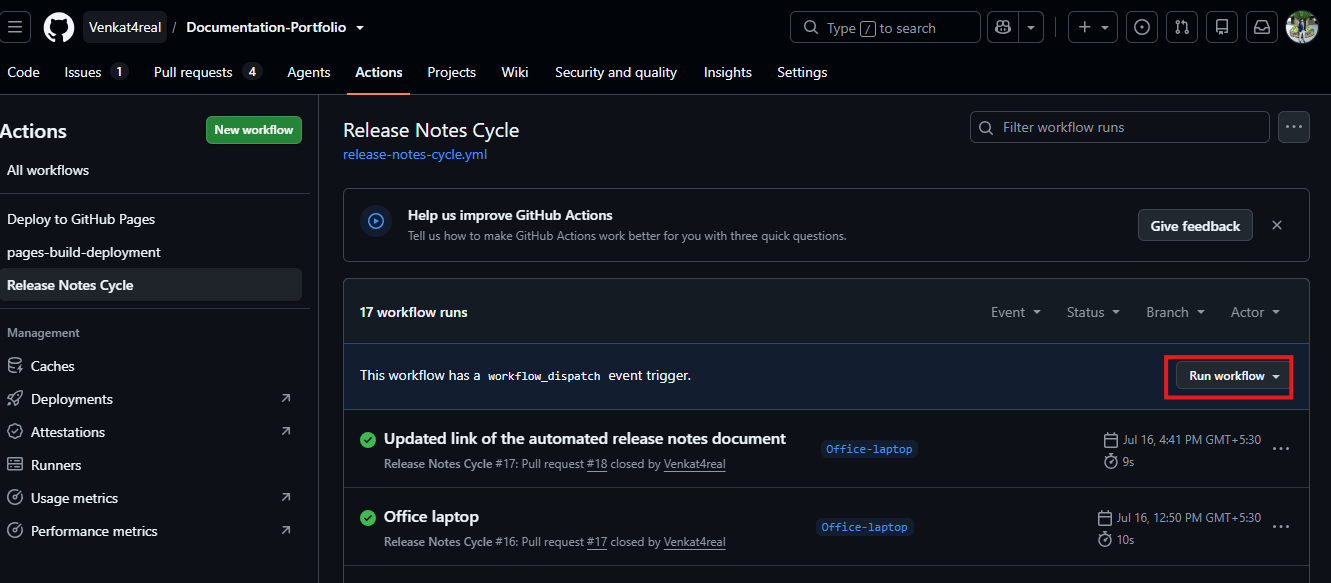
- Manual run: A repository maintainer starts the workflow from the Actions tab.
How the workflow works
1. A pull request is merged
GitHub starts the workflow after a PR is merged into main. The workflow checks out main, installs Node.js, and runs the update script in pr mode.
The script reads the PR number, title, author, merge date, URL, and the documentation files changed by the PR. It then adds an entry under Auto-generated release notes in docs/internal_release_notes.md.
For example, a merged PR titled docs: add troubleshooting steps for sign-in produces an entry similar to:
- **[#42](https://github.com/OWNER/REPOSITORY/pull/42)** - docs: add troubleshooting steps for sign-in *by @octocat, merged 2026-08-16.* - [View article: sign-in-troubleshooting](https://github.com/OWNER/REPOSITORY/blob/main/docs/sign-in-troubleshooting.md)
For every added or updated Markdown file in docs/, the entry contains a link to that file on GitHub. Deleted files and docs/internal_release_notes.md are excluded. A PR that changes multiple articles includes a link for each article.
The script skips a PR that is already recorded, so re-running the workflow does not create a duplicate entry.
2. The workflow commits the update
If the script changes the release-notes file, GitHub Actions commits and pushes the update to main as github-actions[bot]. If there is nothing new to write, the commit step completes without creating a commit.
3. The weekly run archives the entries
On Tuesday, the workflow runs the script in weekly mode. It moves the entries currently under Auto-generated release notes into a new section named with the preceding seven-day date range, then restores an empty auto-generated section.
PR merged → entry added to Auto-generated release notes
Tuesday 09:00 UTC → entries moved to Release Update - Week of YYYY-MM-DD to YYYY-MM-DD
If no PR entries have been added since the previous archive, the weekly run makes no changes.

Writing useful commit messages and PR titles
The generated release-note entry uses the PR title, not the individual commit messages. Write the PR title as a concise, reader-friendly summary of the change. Clear commit messages are still valuable for code review and troubleshooting, and using a consistent style makes both easier to scan.
Use this pattern where it fits:
type: concise description of the change
Common types include docs, feat, fix, refactor, chore, and test.
| Documentation change | Good commit message or PR title | Avoid |
|---|---|---|
| New guide | docs: publish the automated release notes guide |
new guide |
| Revised guide | docs: revise the installation and setup guide |
updated docs |
| New section in an existing guide | docs: add troubleshooting steps for sign-in |
documentation changes |
| Corrected instructions | docs: correct the API authentication example |
fix |
| Updated reference content | docs: update release workflow requirements |
changes |
| Improved clarity or structure | docs: reorganize the release notes workflow guide |
cleanup |
For a PR containing several commits, give the PR a title that describes the outcome rather than repeating every implementation detail. For example:
docs: publish a guide to automated release notes
This is more useful in the release notes than a vague title such as final changes or updates.
Configure the schedule, date range, and files
The workflow has no settings screen. Configure it by editing the workflow YAML file or the update script, then merging the changes into main.
Change the run schedule
The schedule is defined in .github/workflows/release-notes-cycle.yml as a UTC cron expression:
schedule:
  - cron: '0 9 * * 2' # Every Tuesday at 9:00 AM UTC
The five fields are minute, hour, day of month, month, and day of week. For example, to archive entries every Friday at 4:30 PM UTC, use:
schedule:
  - cron: '30 16 * * 5'
GitHub Actions evaluates scheduled workflows in UTC. Convert the intended local time to UTC before changing the expression. The PR-triggered update still occurs whenever a PR is merged into main; changing the schedule only changes when the weekly archive is created.
Change the date range in the weekly heading
The weekly heading is calculated in .github/scripts/update-release-notes.js by formatWeekRange(). It sets the end date to the time the workflow runs and the start date to seven days earlier:
const since = new Date(now.getTime() - 7 * 24 * 60 * 60 * 1000);
To create a 14-day archive heading, replace 7 with 14. Keep the archive period aligned with the workflow schedule. For example, if the schedule runs every two weeks, use a 14-day range. The dates label the archive; the workflow archives every entry currently in the auto-generated section, regardless of its individual merge date.
Choose which PRs and changed files are included
The pull_request.branches setting controls the target branch whose merged PRs can create release-note entries. The current setting includes only PRs merged into main:
pull_request:
  types: [closed]
  branches:
    - main
To include a release branch as well, add it to the list:
branches:
  - main
  - release
To exclude a branch, remove it from this list. The job also checks github.event.pull_request.merged == true, so a PR closed without merging is always excluded.
By default, every merged PR to an included branch is added to the release notes, regardless of which files it changes. To add only PRs that change selected files, add a paths filter under pull_request.
For example, this configuration includes PRs that change Markdown files in docs/, but excludes files in docs/drafts/ and the generated release-notes file itself:
pull_request:
  types: [closed]
  branches:
    - main
  paths:
    - 'docs/**/*.md'                 # Include documentation Markdown files
    - '!docs/drafts/**'              # Exclude draft content
    - '!docs/internal_release_notes.md' # Exclude bot-generated release notes
Use repository-relative paths and quote patterns that contain * or !. Pattern order matters: list an inclusive pattern first, then the exclusions. A PR creates a release-note entry only when at least one changed file matches an included pattern and is not excluded by a later negative pattern.
Common patterns include:
| Goal | Pattern |
|---|---|
Include every file in docs/ |
'docs/**' |
| Include Markdown files anywhere in the repository | '**/*.md' |
| Include one guide | 'docs/AI_automation/automated-releasenotes.md' |
| Exclude generated documentation | '!docs/generated/**' |
| Exclude PNG images | '!docs/**/*.png' |
Do not define paths and paths-ignore together for the same event. Use paths with ! exclusions when you need both inclusion and exclusion rules. If only exclusions are needed, use paths-ignore instead:
pull_request:
  types: [closed]
  branches:
    - main
  paths-ignore:
    - 'docs/drafts/**'
    - 'docs/internal_release_notes.md'
With paths-ignore, the workflow is skipped only when all changed files are ignored. For example, a PR that changes both docs/drafts/outline.md and docs/guide.md still runs. GitHub evaluates these patterns against the files changed in the PR. See the GitHub Actions workflow syntax for the full pattern rules.
Set the output file
The release-notes destination is set in .github/scripts/update-release-notes.js:
const releasePath = path.resolve(__dirname, '../../docs/internal_release_notes.md');
Change this path if release notes should be written to a different Markdown file. The destination file must contain the heading ## Auto-generated release notes; the script uses that heading to find the insertion point.
The workflow commits only this file:
git add docs/internal_release_notes.md
If you change releasePath, update the git add path to match. To commit an additional generated file, add another explicit git add line. Use explicit file paths rather than git add . so the bot does not commit unrelated changes made during the workflow.
Run the workflow manually
To run the workflow outside its normal schedule:
- Open the repository on GitHub.
- Select Actions.
- Select Release Notes Cycle from the workflow list.
- Select Run workflow and confirm the branch.
- Choose Run workflow.
Use a manual run to retry a failed automation run or to archive the current entries before the next scheduled Tuesday run. A manual run uses weekly mode, so it creates the same weekly archive as the scheduled run.
Troubleshooting
- A merged PR did not appear: Confirm that it targeted and was merged into
main, then inspect the Release Notes Cycle run in the Actions tab. - The weekly run did not create a section: This is expected when the auto-generated section has no new PR entries.
- The entry text is unclear: Rename the PR title before merging whenever possible. The automation uses that title as the release-note summary.
- The workflow cannot push changes: Check that the workflow retains
contents: writepermission and that branch-protection rules allow GitHub Actions to push tomain.